
Why this launch matters
Buyers no longer start with ten blue links. More and more, they start with a question in ChatGPT, such as "best CRM for a 20-person sales team" or "who does same-day repairs near me", and they shortlist from the answer.
Until now, brands had no official seat at that table. ChatGPT pieced together your business from your website, reviews, listings and whatever else it could find. If something was wrong, there was no place to fix it.
Businesses in ChatGPT changes that. For the first time, there's a verified, first-party version of your business inside the assistant that hundreds of millions of people use every week.
It's not a ranking lever. It is a source of truth, and in AI search, being the trusted source is half the battle.
First, get the names right
Most early mistakes come from confusing three products with similar names:
| Name | What it is | Who it's for |
|---|---|---|
| Businesses in ChatGPT | The overall program | Any business that wants a presence in ChatGPT |
| Business Hub | The dashboard for managing your profile, team and insights | Marketing, brand and growth teams |
| Business Agent | A branded agent that talks to customers inside ChatGPT | Eligible US ecommerce and online service businesses |
| ChatGPT Business (separate) | A paid ChatGPT subscription for employees | Internal teams. It doesn't claim your profile. |
If someone on your team says "we already have ChatGPT Business, so we're covered", you aren't. Buying seats and claiming a profile are completely separate.
What's live, and what isn't yet
Live in the beta:
- Profile claiming and verification
- Editing verified business details
- Aggregate insights in Business Hub
- Business Agents for eligible US ecommerce and online service businesses
Announced, with no dates:
- More markets and business categories
- Tools for larger, more complex organisations, such as multiple brands, regions and locations
Unclear for now:
- Self-serve product feeds for everyone
- Paid promotion tied to Business Agents
Plan around what's live, and don't build a strategy around what's only rumoured.
How to claim and verify your profile
- Find your listing. Search for your business in the claim flow and select the correct listing. Check for duplicates first.
- Choose a verification method. The options include a text or call, email, a DNS TXT record, or Shopify login for Shopify merchants. Pick the one your team can finish fastest. For most companies with an engaged IT or web team, that's DNS.
- Wait for review. OpenAI reviews the claim before giving you access.
- Complete identity verification. A person on your team confirms their identity through Persona. Have business registration documents and a valid ID ready, and make sure the legal name and address match exactly across everything you submit.
- Complete your profile. Fill in every field and use the same language as your website.
- Add your team. Give access to the people who will maintain the profile, so it doesn't depend on one person's login.
Common blockers:
- The person who controls DNS isn't the person running the claim.
- Registration details don't match the website or listing.
- The claim is started without ID documents ready.
- It isn't clear who owns the profile once it's live.
Tip: assign two owners before you start. One owns the claim, usually marketing. The other owns the facts, which means website, pricing and policy accuracy, usually product or ops.
Who can do what
Eligibility is really three separate questions:
| Question | Who qualifies today |
|---|---|
| Can I claim a profile? | Most businesses, including B2B, SaaS and services |
| Will I see insights? | Yes, but only once your activity passes certain volume levels OpenAI hasn't disclosed |
| Can I run a Business Agent? | Eligible US ecommerce and online service businesses, subject to OpenAI's approval of category and use case |
For B2B and SaaS: claim and verify now. The profile and insights are still valuable even if you can't use an agent yet. When agent access expands, you'll already be verified and ready.
Inside Business Hub: reading your insights
Business Hub shows insights for the last 28 days:
- Mentions: how often ChatGPT referenced your business
- Website clicks: clicks from ChatGPT through to your site
- Discovery topics: the themes people were exploring when they found you
- Profile views: shown in the dashboard, but not yet clearly defined
Read them carefully:
- Blank isn't zero. Data only appears above certain volume levels. A low-traffic brand may see nothing even when ChatGPT does mention it.
- There are no prompts. You see topics, not the actual questions buyers asked.
- There are no competitors. You can't see who appeared alongside you or instead of you.
- It covers one engine. Gemini, Perplexity, Copilot and Google AI Overviews aren't included.
- There are no benchmarks. You can't tell whether your numbers are good for your category.
Record your first 28-day report as a baseline anyway. Even imperfect first-party data is worth tracking over time.
The Business Agent: useful, but limited
For eligible businesses, the Business Agent can:
- Explain products, services and policies
- Compare options
- Link users to your website
It can't:
- Complete checkout or take orders
- Book appointments
- Look up existing orders
It must disclose that it's AI, and it can't invent prices. In effect, it's a well-informed pre-sales assistant, not a sales channel. Feed it accurate, current information, because it will only be as good as the facts you give it.
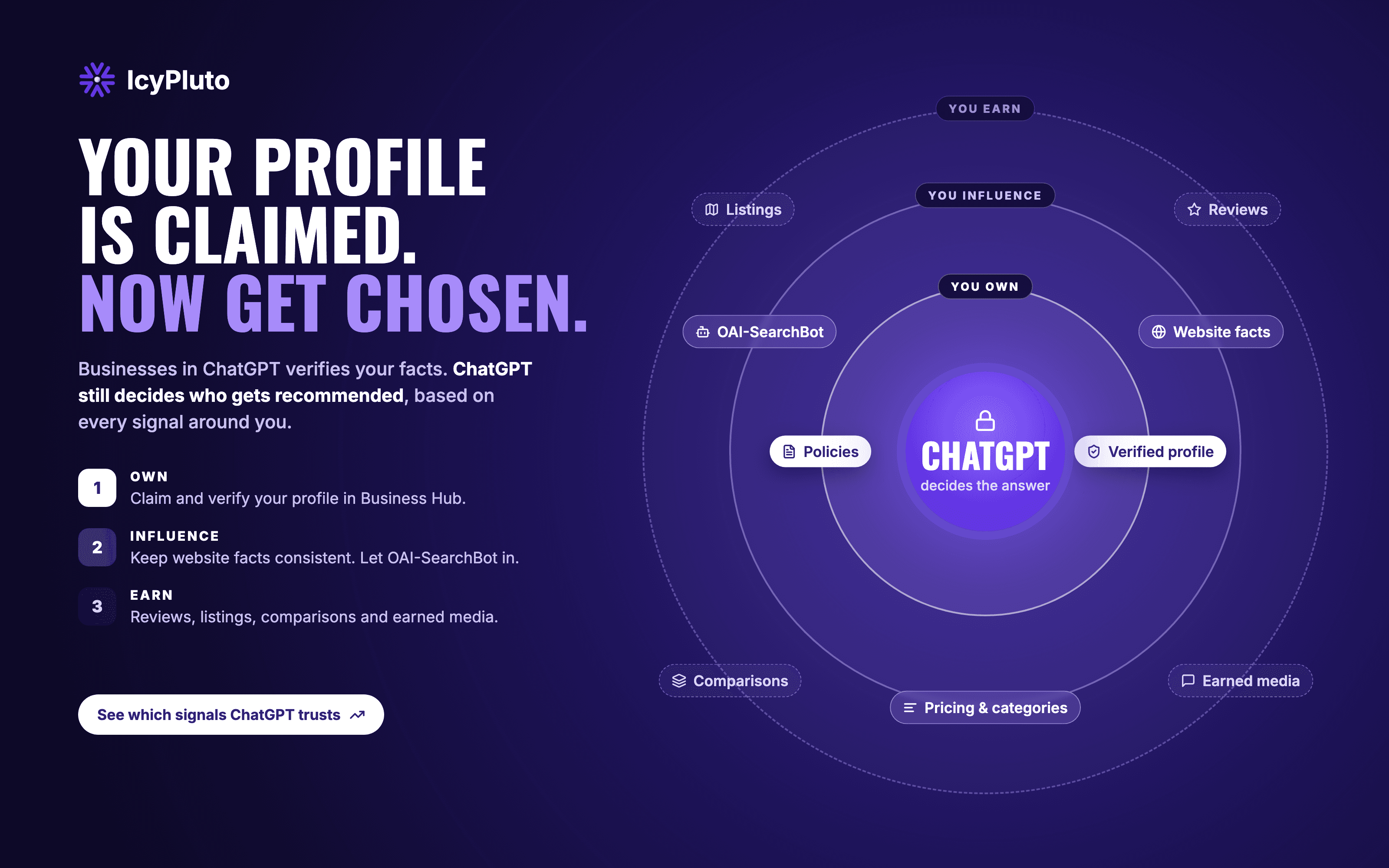
The IcyPluto Control Map: what you actually control
This is the most important idea in this guide. Claiming your profile is step one, not the strategy.
1. You own it (Business Hub)
- Verified profile, name and logo
- Description and policies
- Team access
- Business Agent configuration, if you're eligible
Your job: make it complete, accurate and consistent. This part is fully in your hands.
2. You influence it (your website and the wider web)
- Consistent facts: your website, profile and listings should say the same thing about pricing, categories and policies.
- Crawler access: make sure OAI-SearchBot is allowed in your robots.txt. It governs whether ChatGPT search can see your site. GPTBot is separate and relates to model training.
- Reviews and listings: these are often what ChatGPT actually cites.
- Comparison and use-case pages: these answer the evaluation questions buyers ask.
- Earned media: coverage, roundups and community discussions shape how AI describes you.
Your job: give ChatGPT consistent, credible signals from as many trusted sources as possible.
3. ChatGPT decides (not yours)
- Which businesses get recommended
- Which sources get cited
- How your brand is described
- Which data you get to see
Your job: monitor it closely, because you can't edit it.
Most brands will claim their profile and stop at layer 1. The brands that pull ahead will put most of their effort into layer 2 and measure layer 3 consistently.
Five mistakes to avoid
- Confusing ChatGPT Business seats with a claimed profile. They're unrelated.
- Expecting the claim to boost recommendations. It doesn't. It verifies your facts.
- Reading blank insights as "AI doesn't know us." It may just mean you're below the volume needed for data to appear.
- Letting the profile and the website drift apart. Inconsistent facts weaken trust in both.
- Treating ChatGPT as the whole AI search picture. Your buyers also use Gemini, Perplexity, Copilot and AI Overviews.
Your 6-step action plan
- Assign owners: one for the claim and one for the facts.
- Claim and verify using your fastest method, with documents ready.
- Align your facts across your website, profile, listings and review platforms.
- Check crawler access and confirm OAI-SearchBot is allowed.
- Record your baseline from the first 28-day insights report.
- Track everything else: prompts, competitors, sentiment, cited sources and other AI engines.
FAQ
Is Businesses in ChatGPT free? Claiming and verifying a profile currently has no listed fee.
Will claiming my profile make ChatGPT recommend us more? No. ChatGPT still decides independently. Claiming gives you verified, accurate information and access to insights.
Can B2B and SaaS companies take part? Yes, they can claim and verify. Business Agent access is currently limited to eligible US ecommerce and online service businesses.
Why is my insights dashboard empty? Data only appears above volume levels OpenAI hasn't disclosed. An empty dashboard doesn't necessarily mean ChatGPT never mentions you.
What's the difference between OAI-SearchBot and GPTBot? OAI-SearchBot affects whether your site can appear in ChatGPT search. GPTBot relates to model training. You can manage them separately in robots.txt.
Own the profile. Win everything around it. IcyPluto helps you track the parts of AI visibility you can't claim: which prompts you show up for, which competitors appear next to you, how you're described, and which sources shape your story, across ChatGPT, Gemini, Perplexity, Copilot and AI Overviews.