
Introduction
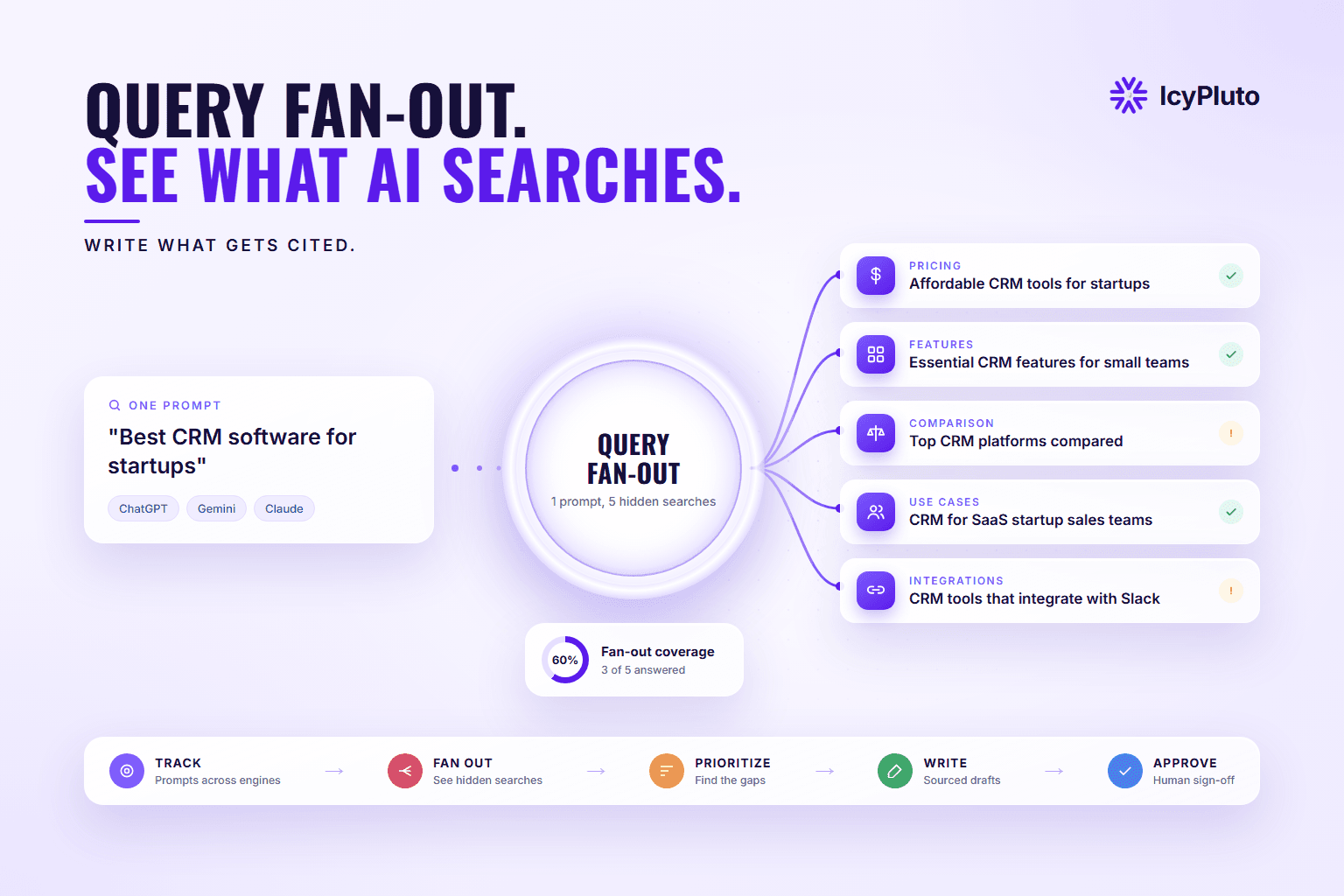
Ask ChatGPT, Gemini, or Claude which CRM a startup should buy, and the engine won't run a single search. Behind the scenes, it looks up pricing, must-have features, head-to-head comparisons, integrations, and use cases. Then it reads what it found and writes one answer.
This process is called query fan-out, and it changes what a page needs to do to be included. Ranking for the main keyword still helps. But a page that skips the sub-questions the engine looked up gives it fewer reasons to pull from you. That holds even when your product is a good fit.
Keyword tools show what people type, and visibility trackers show whether your brand appeared. What happens in between, the searches the engine ran on the user's behalf, has mostly been hidden. IcyPluto makes those searches visible and connects them to the content you write next.
What Is Query Fan-Out?
Query fan-out is a retrieval technique in which an AI search system breaks a user's question into multiple related sub-queries, runs a search for each one, and merges the most relevant results into a single response. It lets the engine answer complex, multi-part questions that one search alone would answer poorly.
Google has described the technique in its own words. In the May 2025 announcement of AI Mode, Google's Head of Search Elizabeth Reid wrote that AI Mode uses a "query fan-out technique," breaking a question into subtopics and "issuing a multitude of queries simultaneously on your behalf" (Google, 2025). The same announcement says Deep Search takes the technique further and "can issue hundreds of searches" for a single research question.
Other AI assistants follow a similar pattern when they browse the web. They turn your prompt into one or more searches, read the results, and write a response.
How Does Query Fan-Out Work?
The engine reads the prompt, breaks it into sub-queries, searches each one, keeps the best passages, and writes a single answer from them. Each of those steps is also a point where your page can be picked up or skipped. Exact methods differ by engine and are not fully published.
1. Read the prompt. What the engine does: Works out what the user wants, including needs they did not state. What it means for your content: Say early who the page is for and what problem it solves.
2. Break it down. What the engine does: Turns one question into several narrower searches. What it means for your content: Give each likely sub-question its own clear heading.
3. Search. What the engine does: Runs those searches, often at the same time. What it means for your content: The page must be crawlable and indexed, and your brand should appear on other sites too.
4. Keep the best passages. What the engine does: Scores what it found and keeps the most relevant, trustworthy sections. What it means for your content: Open each section with a direct answer that makes sense on its own.
5. Write the answer. What the engine does: Combines the kept passages into one response, sometimes with citations. What it means for your content: Use specific, sourced facts that are easy to quote.
Engines pull individual passages, not whole pages. So your page doesn't have to match the original prompt word for word. One well-written section that settles one sub-query can be enough to get you cited.
What Are the Types of Fan-Out Queries?
Most fan-out queries fall into six types: reformulations, narrower specifications, comparisons, implicit needs, recency checks, and contextual variations. The useful part is what each type asks of your page.
Reformulation. What the engine does: Rewords the prompt. Example for "best CRM for startups": "top CRM platforms for early-stage companies" What to add to your page: Natural synonyms in headings and opening lines, without stuffing.
Specification. What the engine does: Narrows to a detail. Example for "best CRM for startups": "CRM with free plan for under 10 users" What to add to your page: Exact limits, numbers, and plan names in plain text.
Comparison. What the engine does: Weighs options against each other. Example for "best CRM for startups": "HubSpot vs Zoho CRM for startups" What to add to your page: A comparison table with honest "best for" verdicts.
Implicit need. What the engine does: Looks for something the user did not say. Example for "best CRM for startups": "CRM setup time for small teams" What to add to your page: Setup time, learning curve, and hidden costs.
Recency. What the engine does: Adds a time frame. Example for "best CRM for startups": "best startup CRM this year" What to add to your page: A visible "last updated" date and current pricing.
Contextual. What the engine does: Adjusts for location, industry, or role. Example for "best CRM for startups": "CRM for SaaS founders in India" What to add to your page: Short sections by region, industry, or team size.
When you review fan-outs, look at the type before the wording. Three comparison queries in a row tell you more than any single phrasing: the page needs a comparison table.
Observed vs. Generated Fan-Out: What's the Difference?
Observed fan-out is the set of searches an AI engine actually runs to answer a prompt. Generated fan-out is the set of sub-queries your team or content system creates to plan an article. Most guides treat them as one thing, but they answer different questions.
Who creates it: observed fan-out: the AI engine, behind the scenes; generated fan-out: your team or your content system.
Purpose: observed fan-out: retrieve sources to build an answer; generated fan-out: plan research and structure content.
What it tells you: observed fan-out: what the engine actually looked for; generated fan-out: what a complete article should cover.
Weakness: observed fan-out: changes by engine and by run; generated fan-out: can include angles nobody searches.
Each one fixes the other's weakness. Observed fan-outs keep your plan grounded in what engines really look up. Generated fan-outs make sure the article is complete, even on angles an engine skipped this time.
Query Fan-Out Example: "Best CRM Software for Startups"
A single commercial prompt like "best CRM software for startups" typically fans out into pricing, features, comparison, use-case, and integration queries. Here is what that looks like:
Pricing: Affordable CRM tools for startups
Features: Essential CRM features for small teams
Comparison: Top CRM platforms compared for startups
Use cases: CRM for SaaS startup sales teams
Integration: CRM tools that integrate with Slack
A page built only around the main phrase covers one of these angles. A page that handles all five, each in its own clearly headed section with evidence, gives the engine five chances to pick it up.
Why Does Query Fan-Out Matter for SEO and GEO?
Query fan-out matters because AI engines pick sources at the sub-query level. Pages that clearly answer more of those sub-questions have more chances to be retrieved and cited. It also improves classic SEO by showing which related intents to cover.
For research, fan-out surfaces questions buyers ask beyond the exact query. For planning, it tells you what sections a post needs before anyone starts writing. For SEO, related intents become supporting articles and internal links around a pillar page. For GEO, well-structured coverage of those sub-questions raises the odds that an AI answer quotes you.
Coverage alone won't get you cited, though. Engines still weigh accuracy, authority, freshness, and what the rest of the web says about your brand. Fan-out shows you what to cover; quality and reputation decide whether you're picked.
How Does Fan-Out Differ Across AI Engines?
Every major AI engine fans out, but the number, focus, and wording of the sub-queries vary by engine and from one run to the next. None of the major providers publishes exact counts for everyday prompts.
Google has documented fan-out for AI Mode and Deep Search most openly. ChatGPT, Gemini, and Claude also turn prompts into web searches when they browse, but each one makes its own choices about what to look up. Two engines can answer the same prompt using quite different sources.
In practice, you need to check fan-outs per engine and focus on the engines your buyers actually use. A single blended view hides where you're being left out.
How Do You Find Fan-Out Queries?
You can find fan-out queries manually by inspecting what an AI engine searches while it answers a prompt, or at scale with a platform that captures fan-outs for every prompt you track. Manual methods are free but slow and inconsistent.
Manual methods:
Watch the engine's search steps. Some assistants show the searches they ran, or let you expand a "searching" step. In ChatGPT, the queries have also been visible in the browser's developer tools while a web-search answer loads. These interfaces change often, so check what's currently available.
Ask the model directly. Prompt it with "What searches would you run to answer this?" This gives you generated sub-queries, not observed ones, but it's a quick starting list.
Repeat the prompt. Run the same prompt several times and across engines. Write down which sub-queries keep coming back.
The limits of doing it by hand: you can check only one prompt and one engine at a time. Results vary from run to run, and nothing is stored to compare later. That works for a single article. It doesn't work for a content program.
At scale: IcyPluto captures fan-out queries for every tracked prompt, across engines, on each refresh, so you can see patterns rather than snapshots.
How IcyPluto Turns Query Fan-Out Into a System
IcyPluto connects four steps that usually live in separate tools. It shows what engines search, plans what to cover, writes it with evidence, and routes every draft to a human for approval.
1. Query Fan-Out: See What Each Engine Searches
For each prompt you track, IcyPluto shows the original prompt next to the fan-out queries the engine generated to answer it.
Look for words the user never typed. Qualifiers such as "best," "reviews," "pricing," or a year show what the engine thinks a good answer must include.
2. Engine-by-Engine View
ChatGPT, Gemini, and Claude can fan out the same prompt differently. IcyPluto keeps each engine's fan-outs separate, so you can see where your content matches each engine's searches and where it falls short.
3. Recurring Patterns Over Time
The same prompt can produce slightly different fan-outs on each run. IcyPluto re-runs tracked prompts on every refresh, which lets you separate intents that keep recurring from one-off phrasing.
4. Fanout Query Builder: Complete the Plan
Observed fan-outs show what engines search today. The Fanout Query Builder fills in what a complete article should also cover. Give it a topic, target audience, and objective, and it:
Identifies the search intent, such as commercial investigation.
Generates related questions, comparisons, subtopics, and long-tail variations.
Removes duplicate and irrelevant queries.
Ranks what remains by relevance and user intent.
Sends the selected queries to web search and your knowledge base.
Passes the filtered findings to the writing agents.
You get a research plan before drafting begins.
5. Agentic Writing: From Sub-Queries to a Sourced Draft
Specialized agents then turn that plan into a full draft. A research agent gathers information from the web and your knowledge base. An outline agent maps sections to the sub-queries that matter. A writing agent drafts in your chosen tone, and an editing agent checks grammar, readability, and flow. Finally, an SEO and GEO agent structures the piece for search and AI engines, while a fact-check agent verifies claims and attaches sources.
Each draft comes with an SEO title, meta description, structured headings, FAQs, source references, and an SEO and GEO quality report.
6. Human Approval Before Publishing
Nothing publishes on its own. Every draft goes to review, where your team edits, approves, or sends it back. Your people set the strategy and give final sign-off. The agents handle research, drafting, and optimization.
See the searches behind your prompts. IcyPluto shows the fan-out queries AI engines run for the prompts you care about, and helps your team write the content that answers them. Book a Strategy Call
Normal Query vs. Fan-Out Queries
Normal query: one search question. Fan-out queries: multiple related questions.
Normal query: narrower coverage. Fan-out queries: broader topic coverage.
Normal query: less research. Fan-out queries: more research.
Normal query: lower search cost. Fan-out queries: potentially higher cost.
Normal query: built around what users type. Fan-out queries: built around what engines search.
Normal query: one keyword target. Fan-out queries: several intents answered in one strong page.
How Do You Decide Which Fan-Out Queries to Target?
Prioritize fan-out queries that recur across runs and engines, match buying intent, expose a gap in your current content, and can be backed by real evidence. Most articles need 5 to 8 of these, not every variation.
Fan-out lists grow quickly. One seed topic can produce dozens of variations, sometimes hundreds. A focused article that answers a handful of high-value sub-queries well will usually do better than a bloated one that touches forty.
Score each candidate with four questions:
Does it recur? Intents that show up across runs and engines are the most reliable.
Is it close to a buying decision? Comparison, pricing, and "best for" queries tend to sit nearest to revenue.
Is it a gap? If your existing content already answers it well, move on.
Can you support it? Without a credible source or first-hand expertise, the answer is unlikely to be cited.
Queries that pass all four go straight into the outline. Those that pass three may deserve their own supporting article.
How Do You Optimize Content for Query Fan-Out?
Give each sub-query you chose its own clearly headed section that answers it directly with evidence. Then make sure engines can find your brand beyond your own site. In practice, that comes down to five moves.
1. Turn the fan-out list into an outline
Group your chosen sub-queries by intent. Give each group an H2 or H3 phrased the way people ask it. If two sub-queries need the same answer, they share a section. If one needs a long answer, give it its own page and link to it.
2. Make every section stand on its own
Engines quote passages, not pages. Open each section with a one- or two-sentence answer, then add the detail. Name the subject instead of writing "it" or "this," so the passage still makes sense when it is lifted out of context.
3. Put the specifics on commercial pages
Product fan-outs tend to be narrow: price, free plan limits, refund terms, integrations, setup time. Put those facts on your product, pricing, and comparison pages as plain text, not only inside images or PDFs. A B2B software company might add a short "plans and limits" table. An online store might list sizing, materials, and delivery times on every product page.
4. Add structured data where it fits
Article, FAQPage, Product, and Organization markup help machines read a page correctly. Markup alone won't win you citations, but it removes doubt about what the page covers and who published it.
5. Be findable beyond your own site
Engines search the wider web, so mentions elsewhere count: reviews, industry directories, podcasts, press, and community threads. Our guide to citation seeding covers how to build these on purpose.
How Do You Measure Fan-Out Coverage?
Measure fan-out coverage by checking how many of the recurring fan-outs for your key prompts your pages actually answer. Then watch whether engines cite or mention you more once the gaps are filled. Check each engine separately, and give changes a few weeks to show.
A simple way to put a number on it:
Fan-out coverage = recurring fan-outs your pages answer ÷ recurring fan-outs you track
If a prompt has 12 fan-outs that keep coming back and your pages answer 7 of them, your coverage for that prompt is 58%. That gap of five is your content plan.
Fan-out coverage. What it tells you: How much of what engines search your pages answer. Where to check it: Fan-outs from your tracked prompts, mapped to page sections.
Citation rate. What it tells you: How often engines link to your pages for tracked prompts. Where to check it: AI visibility tracking, per engine.
Share of voice. What it tells you: How often engines mention you compared with competitors. Where to check it: IcyPluto's AI share of voice reporting.
Business impact. What it tells you: Whether visibility turns into visits, sign-ups, and pipeline. Where to check it: AI referral traffic, branded search, and self-reported attribution.
Expect noise. Answers change from run to run, so judge trends across several refreshes, not one day's result. Re-check your priority prompts after each major content update. For more on choosing metrics, see our guide to AI visibility measurement.
What Mistakes Should You Avoid?
The most common fan-out mistakes are building a page for every variant, chasing exact wording, and assuming coverage guarantees citations. Others are subtler.
One page per variant. Fan-out queries describe intent. Group related ones into a single strong page rather than spinning up thin pages.
Chasing exact phrasing. Sub-queries shift between runs, so write for the underlying intent.
Blending engines together. An average across engines can hide the one where buyers are not finding you.
Thin evidence. Wide coverage built on unsourced claims rarely earns a citation.
Expecting guarantees. Fan-out tells you what to cover. Accuracy, authority, and freshness decide the rest.
Taking people out of the loop. Fast content that is wrong or off-brand costs more than it saves.
FAQ
What is query fan-out in simple terms?
Query fan-out is when an AI engine turns one question into several smaller searches, gathers sources for each, and combines them into one answer. Your content competes for those smaller searches as well as the original question.
Are fan-out queries the same as long-tail keywords?
No. Long-tail keywords are phrases real people type into search. Fan-out queries are created by AI engines in the background and often have little or no measurable search volume. Both are specific, but you find and use them differently.
Do all AI engines fan out the same way?
No. ChatGPT, Gemini, Claude, and Google AI Mode can generate different sub-queries for the same prompt, and none publishes exact counts. That is why IcyPluto shows fan-out queries per engine.
Why do fan-out queries change from one run to the next?
AI responses are probabilistic, so the exact sub-queries can vary each time a prompt runs. The reliable signal is the intent that keeps recurring, not any single phrasing.
How do I find fan-out queries for free?
Watch the search steps an assistant shows while it answers, ask the model what it would search for, and repeat the prompt across engines. These methods work for one article at a time but are slow to repeat.
How many sub-queries should one blog cover?
There is no fixed number. For most articles, 5 to 8 well-chosen sub-queries, each answered clearly with evidence, is a strong starting point. Pillar pages can cover more.
How do you measure fan-out coverage?
Divide the recurring fan-outs your pages answer by the recurring fan-outs you track for a prompt. Then follow citation rate and share of voice per engine over several refreshes to see whether closing gaps changes how often you appear.
Does covering fan-out queries guarantee AI citations?
No. Coverage makes content more complete and relevant, but citations also depend on accuracy, authority, freshness, and your brand's presence across the web.
Who approves content created with IcyPluto?
Your team does. IcyPluto's agents research, outline, write, edit, optimize, and fact-check, then hand over a draft for human review. Nothing publishes without approval.
Conclusion
AI engines now answer questions by running many searches at once. The brands that show up are the ones whose content answers those background searches well and backs the answers with sources.
IcyPluto brings that whole workflow into one place. You see what engines search for your prompts and plan what to cover. Then you generate a sourced draft, and your team approves it before it goes live.
To go deeper, read how IcyPluto approaches prompt research, AI visibility measurement, AI share of voice, and citation seeding.
Want to see the fan-out queries behind your own prompts? Book a Strategy Call and we'll walk you through your fan-outs, your coverage gaps, and the content that would close them.